


The simple answer: it makes AI work visible
An AI agent can research a question, draft content, examine a project, change files, or explain what it found. MagicAssist organizes everything around that task. It helps a team decide what matters, name an owner, provide the right context, follow progress, handle blockers, and review the result. The agent does the work. MagicAssist gives the work a clear path from request to decision.
The shortest useful description is this: MagicAssist is an operating layer for human and agent work. It uses the familiar shape of issues, assignees, priorities, projects, comments, and statuses, then connects those objects to agent runtimes. A person can assign an issue to an agent from the same place they would assign it to a teammate. MagicAssist turns that assignment into executable work, routes it to a connected environment, and returns progress to the issue where everyone can see it.
This distinction matters because an agent session and a team workflow are not the same thing. A session answers, “Can this tool do the task?” A workflow must also answer, “Why are we doing it, who owns the result, what evidence counts as complete, and what happens next?” MagicAssist does not replace the coding tool. It keeps the tool focused on execution while giving the team a shared place to operate the work.
Three components, three different jobs
MagicAssist is distributed by design. The coordination service, the runtime daemon, and the AI coding tool each own a different responsibility. Understanding that split makes the rest of the product easier to reason about.
| Component | What it owns | What it does not own |
|---|---|---|
| MagicAssist server | Workspaces, issues, assignments, comments, task state, and dispatch | Your local repository, coding-tool credentials, or command execution |
| Daemon | Connection to a machine, runtime registration, task claiming, and process supervision | Product priorities or acceptance decisions |
| AI coding tool | Reading the task envelope, using available tools, changing files, and producing the result | The team’s shared queue or long-term operating record |
The server is the front of house. It records what the team intends to do and what state that work is in. The daemon runs on a connected machine or dedicated environment. It detects supported coding tools, registers runtimes, asks the server for eligible tasks, and starts the right tool when work arrives. The coding tool—such as Claude Code or Codex—does the actual work with the repositories, commands, and authorized tools available in that environment.
Because these responsibilities are separate, the shared workspace does not need to become the execution environment. Teams can keep repositories and credentials where their runtimes already use them. MagicAssist coordinates the assignment and records the outcome; the runtime remains responsible for the toolchain and access required to perform it.
An issue becomes an execution, not a copied prompt
Consider a normal product task: update an onboarding flow, fix an API bug, review a pull request, or research a new integration. In a manual agent workflow, someone opens an issue, copies the useful parts into a terminal, starts an AI agent, watches the run, and later pastes a summary back into the issue. The operator is the bridge between planning and execution.
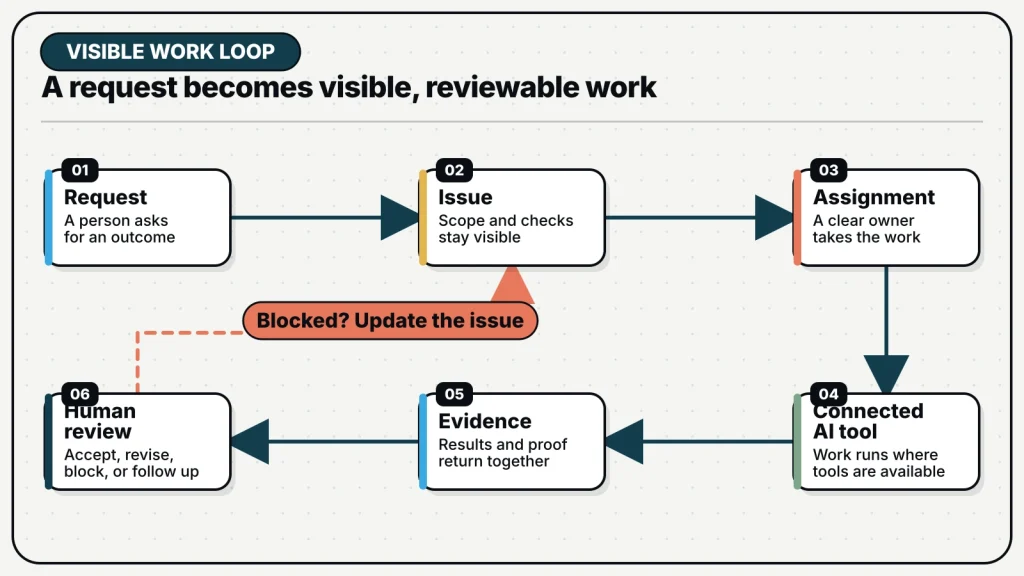
In MagicAssist, the issue itself is the handoff. When an eligible issue is assigned to an agent, the server creates a queued execution task. A compatible online runtime claims it. The daemon prepares the working environment and invokes the configured coding tool. As the task runs, its state moves through visible stages and the agent can report progress through issue comments. The final result is attached to the same unit of work that carried the original objective.
- Plan: write the issue, priority, project, and acceptance checks.
- Assign: choose a person, agent, or appropriate team routing path.
- Dispatch: MagicAssist creates a queued task for a compatible runtime.
- Execute: the daemon starts the coding tool in its configured environment.
- Report: progress, blockers, and results return to the issue.
- Review: a person inspects the evidence and decides what should happen next.
The benefit is not that every task succeeds on the first attempt. The benefit is that success, failure, delay, and review have visible places in the workflow. A failed run is not a vanished terminal. A blocker is not trapped in one person’s memory. A correction can refer to the same issue, source material, and task history.
Four ways to start agent work
Not every request deserves the same amount of ceremony. MagicAssist provides several trigger paths because “own this issue,” “take a quick look,” “let us talk this through,” and “run this every Monday” are different collaboration patterns.
- Assignment gives an agent formal ownership of an issue. Use it when the agent is responsible for moving the work toward completion.
- An @mention starts issue-bound work without changing the assignee. Use it for a focused review, investigation, or contribution.
- Chat supports a conversation that does not yet belong to an issue. It is useful for questions, exploration, or drafting the work before it is scheduled.
- Autopilots represent standing work. They can start from a schedule, a webhook, or a manual run and can create a normal issue for each execution.
Choosing the trigger is part of task design. Assignment is appropriate when ownership should be visible on the board. A mention is lighter because it does not rewrite ownership. Chat is useful before the work has a stable shape. An Autopilot is appropriate only after the work can be described well enough to repeat without rebuilding the instruction every time.
Context has several homes
Teams often respond to weak agent output by making the prompt longer. That works only until the prompt becomes a mixture of current instructions, old decisions, source documents, examples, and remembered preferences. MagicAssist separates these jobs. The issue description and comments hold the immediate task conversation. Memory can retain scoped facts, episodes, and summaries that should survive a run. Knowledge Base stores source documents and retrieves relevant passages with citations. Skills package repeatable methods and supporting files.
The separation is practical. A product specification should remain a source document, not be reduced to an unattributed memory. A preference such as “use pnpm with a frozen lockfile in CI” may be a useful workspace fact. A deployment review procedure belongs in a Skill if agents should follow the same steps repeatedly. The current objective and acceptance checks still belong in the issue. Good context design is less about collecting everything and more about putting each kind of information where its authority is understandable.
What changes for a small team
For one person running one agent, informal coordination can be enough. The cost appears when there are several repositories, tools, machines, reviewers, or recurring workflows. Then the operator spends more time deciding where a run belongs, reconstructing what an agent knew, checking whether it is still running, and translating the result back into team language.
MagicAssist makes that operating work explicit. Priorities live beside both human and agent assignments. Runtime health is visible before a task is handed off. The issue timeline retains the request and the agent’s report. Reusable Skills reduce repeated setup. Autopilots convert standing instructions into inspectable runs. Memory and Knowledge Base reduce the need to begin every task from an empty prompt.
The AI agent supplies execution capacity. MagicAssist gives that capacity a queue, an owner, a context boundary, and a review path.
None of this removes judgment. People still choose priorities, approve access, decide what “done” means, review consequential changes, and improve the workflow when a result is weak. The product is useful precisely because those decisions stay visible instead of being hidden behind a claim of full autonomy.
Start with one workflow you already repeat
The best first use is not “run the company.” Choose one piece of work that already has an owner and a recognizable finish: triage a small bug, prepare a weekly repository report, update a documented dependency, or review a bounded pull request. Write it as an issue. Include the source material and the evidence a reviewer should inspect. Connect one runtime, configure one agent, and assign the work.
Watch the whole handoff. Did the runtime have the required repository and tool access? Did the issue contain enough context? Did the agent report a blocker where the team could act on it? Could the reviewer decide from the artifact and comments without opening the original terminal session? The answers show what to improve next.
Once one workflow is legible, repeat it. If the same instruction or setup keeps returning, turn it into a Skill. If a stable fact repeatedly goes missing, give it an appropriate Memory scope. If the work depends on a maintained specification, place the document in Knowledge Base. If the task becomes genuinely repeatable, consider an Autopilot. MagicAssist becomes valuable through this progression: make the work visible, make the handoff clear, then make the pattern reusable.