


Automate the reminder, not the judgment
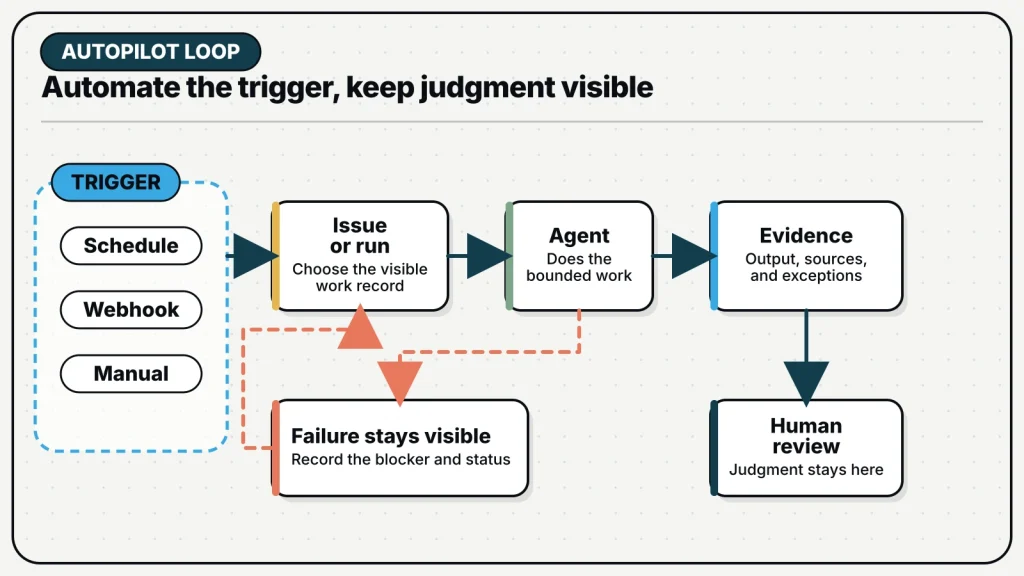
An Autopilot starts a familiar piece of AI work on a schedule, from an event, or when someone presses Run. It is useful when the team already understands the task. Think weekly summaries, routine checks, request triage, or recurring research. The goal is not to remove people from the process. It is to stop relying on someone to remember the same handoff every time.
The trigger is the easy part. A cron expression can start almost anything. The harder question is whether the work has a stable contract: known inputs, a bounded objective, an inspectable output, and a clear response when the run fails or the source data is incomplete. Scheduling a vague prompt does not make the workflow reliable. It repeats the ambiguity.
A good Autopilot starts as a task the team has already run and reviewed manually. The early runs expose missing context, changing assumptions, and decisions that cannot be automated responsibly. Once those are understood, the Autopilot can carry the stable portion while leaving judgment with the appropriate person.
Choose create-issue mode by default
MagicAssist supports two execution modes. In create-issue mode, every trigger creates an issue and assigns it through the normal agent workflow. In run-only mode, the Autopilot enqueues a task directly and records it only in the Autopilot’s run history. The default recommendation is create-issue mode.
| Mode | What the team sees | Use when |
|---|---|---|
| Create issue | A normal issue with assignee, status, comments, project context, and task history | The output needs review, follow-up, discussion, or an audit trail on the board |
| Run only | A run record and task in the Autopilot history, without a board issue | The work is low-friction, self-contained, and the history view is sufficient |
Create-issue mode makes standing work part of the same operating system as manually planned work. A weekly risk report can enter Todo, move to In Progress, collect the agent’s comments, and wait in In Review. A failed or blocked run leaves a visible issue that someone can act on. Project assignment can also bring the relevant Knowledge Base context into the task.
Run-only mode is not inferior, but it removes the board-level collaboration surface. Use it when the result is consumed elsewhere, the run history provides enough traceability, and the team does not need issue comments or status. If people repeatedly ask where the output went or who should review it, switch to create-issue mode.
Pick a trigger that matches the source event
Autopilots support three practical ways to start a run. A schedule expresses time-driven work. A webhook expresses event-driven work. A manual trigger lets the team validate or rerun the exact same configuration without waiting for either.
- Schedule: use a five-field cron expression and an explicit IANA timezone for work such as weekday summaries, weekly audits, or nightly checks.
- Webhook: use a generated bearer URL when an external system should start the work with a JSON payload.
- Manual: use Run now or the CLI trigger command while developing, debugging, or intentionally repeating a run.
Timezones deserve attention. “Every morning” is not a schedule until the team chooses whose morning. Record the timezone and consider daylight-saving changes. The scheduler checks for due work periodically, so design around the minute rather than expecting exact-second execution. If the server restarts across a scheduled time, due work can be caught up after startup; the task description should tolerate a slightly late start.
A webhook URL is a credential. Anyone who holds it can trigger the Autopilot. Do not paste it into public issues, screenshots, or general chat. Rotate the URL if it leaks. Validate the incoming payload inside the task before using fields as instructions, especially when the source system can carry user-controlled text.
Write a recurring contract, not a recurring wish
The Autopilot description should tell the agent what remains stable across runs and where to find what changes. Avoid copying a date, repository state, or team roster that will become stale. Point to the current source. Define what to do when that source is missing or contradictory.
Objective: Prepare the weekly delivery-risk report.
Trigger: Monday at 09:00 in the team's operating timezone.
Inputs: Open high-priority issues in the Launch project and the approved launch brief.
Output: One issue with risks, owners, missing decisions, and source links.
Boundary: Do not change priorities or due dates.
Stop condition: If the launch brief is unavailable, report the missing source and do not infer dates.
Review: Project lead moves the issue from In Review after resolving or assigning each decision.
This contract separates collection from decision. The agent can gather issue state, compare it with the brief, and prepare a structured report. It cannot silently change the plan. The issue gives the project lead a place to make those decisions with the source material and open questions visible.
For create-issue mode, the title can include the supported date placeholder so each run is identifiable. Keep the rest of the title stable enough to search. Do not encode every variable into the title; the description and trigger payload are better places for run-specific context.
Design for changing inputs
Recurring work usually depends on live sources: current issues, repository state, a calendar, a connected service, or an uploaded document. The task should retrieve the source at run time and record what it used. If the output makes a claim, include a link, identifier, timestamp, or citation that lets a reviewer inspect the basis.
- Name the authoritative source for every major section of the output.
- Record the time window, timezone, project, or filter used.
- Separate “no matching data” from “source could not be reached.”
- Do not treat an empty result as success without checking source health.
- List incomplete or contradictory inputs instead of repairing them silently.
- Keep secrets out of issue bodies, comments, and webhook payload summaries.
Knowledge Base and Memory can help, but they do not remove the need to identify current sources. A policy document may come from Knowledge Base. A stable reporting preference may come from Memory. The issue and run context still need to specify the current period and the objects being reviewed.
Treat failure as part of the workflow
Autopilot failures are recorded in run history and are not automatically retried like some assignment or mention tasks. This avoids stacking a retry on top of the next scheduled run and creating duplicates. It also means the team must decide how important failures become visible.
For low-stakes work, checking the Autopilot history may be enough. For important work, use create-issue mode and design a success signal that a reviewer expects. A missing report can then be noticed. You can also route a final result to an approved channel when that integration is configured, but delivery should not be the only record of the run.
Differentiate failure types. A runtime-offline skip requires infrastructure attention. A source-access error may require refreshed credentials. A task that completes but reports contradictory inputs may require a product decision. A report with no matching items may be a valid empty result. The Autopilot prompt should ask the agent to state which condition occurred.
Reliable recurring work is not work that never fails. It is work whose success, failure, and missing inputs are visible enough for the team to respond.
Three patterns that work well
A weekly project review can create an issue that summarizes changed priorities, blocked work, overdue decisions, and issues awaiting review. The agent gathers and structures; the project lead decides. This is a good first Autopilot because the output is visible and the review boundary is natural.
A repository maintenance check can inspect dependency age, failing workflows, or unreviewed pull requests and produce a bounded report. It should not apply upgrades merely because a newer version exists. Separate detection from change unless the team has a tested, reversible update procedure.
An inbound request triage can start from a webhook, validate the payload, create an issue, classify the request against approved criteria, and list missing information. The generated webhook URL must be protected, and the agent should treat payload text as untrusted input rather than as authority to override its task boundaries.
Launch one Autopilot through staged trust
Begin with a manual trigger in create-issue mode. Review the resulting issue closely. Run it again with a changed source state. Test an empty result, a missing input, and an offline runtime. Confirm the timezone and title. Confirm that the assigned agent has the required runtime, Skills, and project access. Only then enable the schedule or publish the webhook URL to its source system.
After several runs, inspect the history for repeated reviewer edits, unused output, false alarms, and missing sources. Tighten the contract rather than adding broad instructions. If reviewers consistently make the same safe transformation, consider moving that step into the Skill or task. If every run requires a different judgment, keep that part manual.
An Autopilot is most valuable when it removes the need to remember to start well-understood work. It should not remove the team’s ability to understand what ran, what it used, and what needs a decision. Make the work repeatable first; make the trigger automatic second.