


An agent can only use what its path makes available
An AI agent does not automatically see every file, account, conversation, or project in your company. Its access comes from several layers. The current task provides a purpose. MagicAssist provides selected workspace context. A connected environment provides files and tools. Outside services provide whatever a specific account or credential allows. Understanding those layers is more useful than asking whether the agent is simply “safe” or “powerful.”
The safest setup is not zero access. An agent needs enough access to complete the job. The goal is appropriate access: the smallest useful set, for a clear purpose, with a visible review point. When a new job needs more, expand deliberately. Do not give broad permission merely to avoid thinking about the boundary.
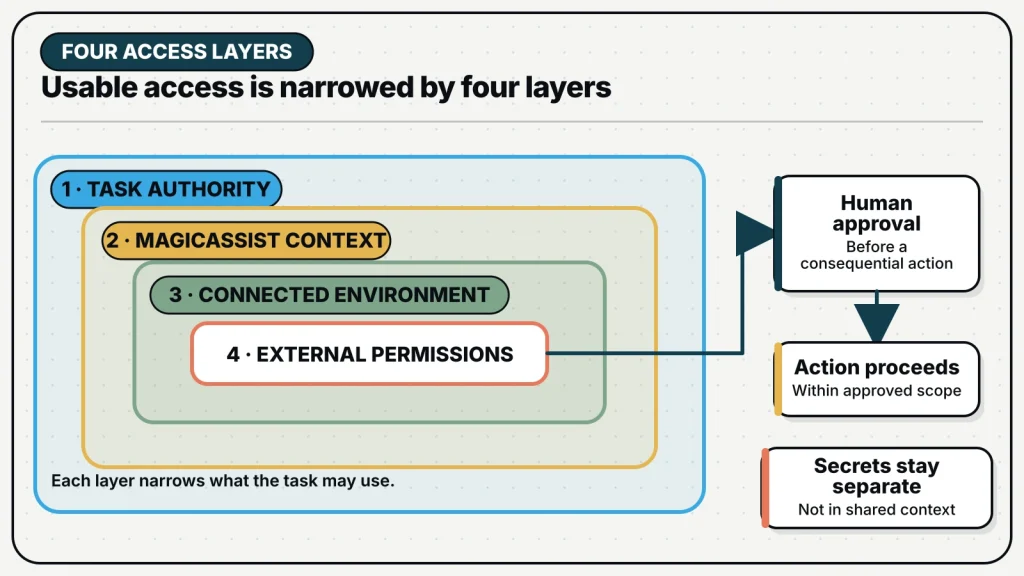
Layer 1: the current task sets the purpose
The issue or chat message tells the agent what it is allowed to work on. A file may be technically reachable, but that does not make it relevant or authorized. Write the scope in ordinary language. Name the project, time window, output, and actions that require approval. Also name important exclusions when a nearby system could be affected.
- Review the Launch project, not every workspace project.
- Draft the customer email; do not send it.
- Inspect the billing export; do not change customer records.
- Prepare the release steps; do not deploy.
- Use public sources and the approved research folder only.
This layer is about authorization, not only capability. A strong agent should report when the task needs an action outside the boundary. The team can then approve a separate step, choose a different agent, or keep that action human-owned. Clear scope prevents helpful initiative from becoming unwanted change.
Layer 2: MagicAssist controls workspace context
Inside MagicAssist, an agent can receive the issue description, comments, project context, attached Skills, relevant Memory, and Knowledge Base material that applies to the task. These sources are not one giant shared prompt. Their scope helps decide what belongs in a particular run. A project document should not leak into unrelated work simply because the same company owns both.
Agent visibility also matters. Workspace agents are available broadly. Private agents can be assigned only by owners, admins, or the agent’s creator. Private does not mean invisible; it limits who may start work with that configuration. Team roles separately govern sensitive management actions such as inviting members or changing a squad.
Chat has a deliberately smaller workspace view
MagicAssist chat is a private conversation between one person and one agent. The agent does not receive issue context and cannot change issues from that conversation. Other workspace members, including admins, cannot read it. This makes chat useful for exploring an idea or asking a question that does not belong on the board.
Private chat is not a substitute for a team record. If the conversation becomes assigned work, create an issue with the agreed outcome and appropriate sources. The issue then provides visible ownership, comments, and review. Do not assume the agent can pull in an issue merely because you remember discussing it elsewhere.
Layer 3: the connected environment provides real tools
The actual work runs in a connected environment. That environment might contain project folders, command-line tools, browser access, local services, or checked-out repositories. The agent can generally use what its process can reach there, subject to the underlying tool and configuration. MagicAssist coordinates the task; it does not turn the shared task board into a remote copy of every machine.
| Environment contains | Possible use | Boundary to decide |
|---|---|---|
| Project files | Read, draft, test, or change work | Which project and which paths |
| Browser or research tools | Find and compare information | Public sources or approved accounts |
| Local commands | Analyze, transform, or verify artifacts | Which commands and side effects are acceptable |
| Connected repositories | Prepare or review changes | Branch, review, and publishing rules |
Choose an environment for the job it supports. A research agent may need browser access but no production system. A content agent may need the brand guide and publishing preview but not customer billing. A software reviewer may need read access and test tools without deployment authority. Separate environments are useful when their risk and maintenance needs differ.
Layer 4: outside services follow their own permissions
An agent may use an approved connection to a calendar, document store, analytics tool, support system, or other service. The service account decides what the connection can read or change. Prefer dedicated accounts or limited scopes when the service supports them. A connection that can read reports does not need permission to manage users.
Treat every external action by its consequence. Reading a public page is different from opening a private dashboard. Drafting a message is different from sending it. Preparing an invoice is different from approving payment. The task should say which step is allowed. For important external changes, keep the final action behind human approval.
Secrets need a different kind of care
Do not paste passwords, private tokens, or high-value credentials into issue descriptions, comments, Memory, Knowledge Base documents, or public screenshots. MagicAssist includes protected storage for certain workspace and channel secrets when the server is configured for it. Those values are masked in the interface and opened only where the product needs them.
Agent-specific environment values require care too. Current product guidance notes that custom environment values are stored in the server database, even though most people see only masked versions. Use limited credentials, rotate them, and avoid root-level or production-wide secrets. The strongest protection is giving the credential less authority in the first place.
Use a four-question access review
- Purpose: What exact outcome requires this access?
- Surface: Is the access coming from the task, workspace context, environment, or outside service?
- Limit: Can the scope be narrowed by project, folder, account, permission, time, or action?
- Decision: Who reviews the result or approves the consequential step?
Record the answers in the agent role, operating handbook, or issue when they matter to the task. Do not record secret values. Review access when an agent changes role, a runtime changes owner, a project ends, or a connected account expands. Old access is easy to forget because normal tasks may not use it for months.
Start read-only, then earn broader actions
A good first run often reads, compares, drafts, or recommends. The reviewer can see whether the agent used the right sources and respected the boundary. The next stage may allow changes inside a reversible workspace. Publishing, deployment, spending, deletion, or customer contact should come later and only when the workflow has strong checks.
This staged approach is not about slowing every task. It separates discovery from consequence. Teams can move quickly on research and drafts while keeping high-impact actions deliberate. When a repeated workflow proves reliable, document the method, keep access narrow, and make the approval point easy to see.
Access should follow the job: enough to produce evidence, narrow enough to understand, and reviewed before consequence.
The plain-English rule
Before assigning the task, imagine explaining the agent’s access to a new teammate in one minute. Say what it can see, what it can change, what it cannot reach, and who approves the result. If that explanation is unclear, the setup is unclear. Fix the boundary before adding more tools or credentials.