


A clear task beats a clever prompt
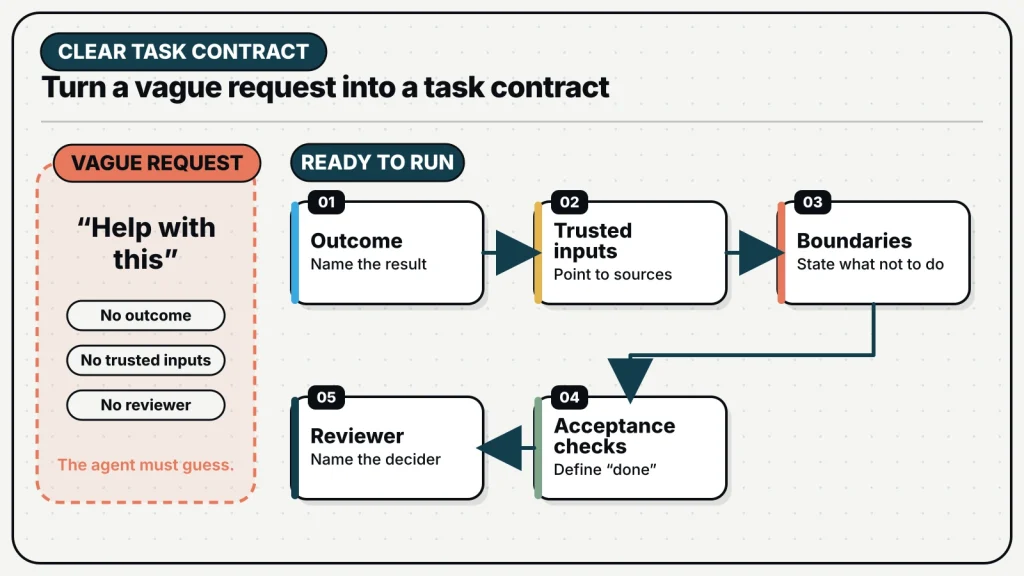
You do not need special prompt-writing language to assign good work. Write as you would for a capable teammate who has just joined the project. State the outcome, share the trusted inputs, name the boundaries, and explain how a reviewer will judge the result. The agent can choose many of the steps. Your job is to make the destination and decision points clear.
This does not mean every issue needs a specification. The useful standard is legibility, not length. “Fix the login bug” is short but hides the failing behavior, affected environment, and acceptance test. A ten-page prompt can be equally weak if it mixes background, old decisions, suggestions, and current requirements without saying which is which. A finishable issue compresses the important decisions into a form another person can verify.
MagicAssist makes this especially important because assigning a non-Backlog issue to an eligible agent can start execution immediately. The issue is not a note someone may interpret later; it becomes the task envelope for a runtime. Better issue writing improves both the run and the review.
Start with an observable outcome
Weak issues describe activity: investigate, improve, help, clean up, look into. Strong issues describe what should exist or be true when the work is ready for review. The outcome can be an artifact, a behavior change, a decision memo, a verified diagnosis, or a set of proposed options. The important part is that the reviewer can observe it.
| Activity-shaped request | Observable outcome |
|---|---|
| Look into slow onboarding | Identify the three longest onboarding requests from a trace, explain the cause, and propose one measured change |
| Improve the docs | Rewrite the runtime setup page so a new user can install, start, and verify the daemon from one sequence |
| Clean up the API client | Remove the duplicate request path while preserving the named response contracts and passing the client test suite |
| Research competitors | Produce a sourced comparison of five products against the approved criteria, separating fact from interpretation |
An observable outcome also helps decide whether the issue is too large. If the sentence requires several unrelated artifacts joined by “and,” split the work. If a reviewer cannot name the evidence they would inspect, the issue is still a topic rather than a task.
Use five fields as a compact operating contract
A practical issue can be built from five fields: objective, inputs, constraints, evidence, and review. These can appear as headings, a checklist, or a concise paragraph. Their purpose is to expose assumptions before execution.
Objective: Update the runtime setup guide so a new user can verify an online runtime.
Inputs: Current CLI reference, daemon docs, and the verified setup commands.
Constraints: Do not change install behavior or document unreleased runtime types.
Evidence: Link the edited page, list commands checked, and include the docs build result.
Review: Maintainer checks technical accuracy and completes the guide once on a clean profile.
Objective names the result. Inputs identify the sources the agent should trust. Constraints protect boundaries and record non-goals. Evidence says how the work will become inspectable. Review identifies the decision that follows execution. If one field is genuinely unknown, write the uncertainty down instead of silently asking the agent to choose.
The fields are not a form to complete mechanically. A small text correction may need only an outcome and one acceptance check. A migration may require rollback constraints, data-preservation rules, and exact verification commands. Use the smallest structure that removes consequential ambiguity.
Separate authority from helpful context
Agents often receive several sources: the issue description, earlier comments, repository instructions, a project specification, an example implementation, and remembered team preferences. If the issue does not establish authority, an old example can look like a requirement and a suggestion can override a current decision.
- Name the primary source for product behavior or design decisions.
- Label examples as examples rather than templates that must be copied.
- Call out superseded documents and stale screenshots.
- Keep current task instructions in the issue, close to the acceptance checks.
- Use Knowledge Base for maintained source documents instead of pasting partial copies.
- Use comments to record decisions made after the issue was created.
When two authoritative sources conflict, the correct task may be to resolve the conflict before implementation. An agent can identify the mismatch and present options, but it should not be forced to invent product direction. Asking for an explicit stop and question is often better than rewarding confident guessing.
Write boundaries the runtime can follow
A boundary is more useful when it maps to the actual environment. “Do not break anything” is not a boundary. “Modify only the standalone website repository; do not change the application repository or deployment” is. “Be careful with production” is vague. “Prepare the migration and verification plan, but do not run it against production” defines a stopping point.
Useful boundaries cover scope, authority, and side effects. Scope says which repositories, modules, pages, or records are involved. Authority says which decisions the agent may make. Side-effect boundaries say whether it may install dependencies, change external services, send messages, deploy, or delete data. MagicAssist can coordinate work across capable runtimes, but capability is not permission. The issue should make the difference clear.
Also specify what should remain unchanged. This is valuable in a shared worktree, a production-adjacent repository, or any task where another person is working in parallel. A sentence such as “preserve unrelated local changes and use a separate worktree” gives the agent a concrete isolation rule.
Make acceptance checks prove the outcome
Acceptance criteria are strongest when each one can be checked directly. “Works well,” “looks professional,” and “handles edge cases” require interpretation. A useful check names a route, command, artifact, state, or comparison.
- The new route returns 200 through the production domain and its reverse proxy.
- The existing application container ID is unchanged after the isolated website deploy.
- The title remains one line at the approved desktop width and does not overflow at 390 pixels.
- The migration preserves the named table rows and its down path refuses irreversible deletion.
- The report cites every external claim and labels assumptions separately.
Tests are evidence, but only for the behavior they cover. A unit test cannot prove that a reverse proxy is live. A build cannot prove that analytics are collecting. A screenshot cannot prove that a migration preserves data. Match each acceptance check to the evidence capable of proving it.
Use status to communicate intent
MagicAssist issues can move through Backlog, Todo, In Progress, In Review, Done, Blocked, or Cancelled. Any status can move directly to another, so the team should agree on what the states mean operationally. A useful pattern is simple: Backlog holds unscheduled ideas; Todo contains work ready to start; In Progress means someone or an agent is acting; In Review means the evidence is ready for a decision; Done means the team accepted the outcome.
Backlog has an important agent-work implication: assigning an agent while the issue remains in Backlog does not start execution. This lets a team decide ownership before scheduling. Move the issue to Todo or In Progress when the work is actually ready. That small distinction prevents premature runs against incomplete context.
Blocked should name the external condition and the person or decision needed to unblock it. Failed execution and blocked product work are not always the same. A runtime can fail while the issue remains valid and ready for retry. An agent can also finish its investigation and correctly report that a product decision is required. Use the issue status and comments to make that difference visible.
Split work at decision boundaries
Large prompts often ask one run to research, decide, implement, deploy, and approve. That hides several different authorities inside one task. Split complex work where a human decision would change what follows. Research can end with sources and options. Planning can end with an approved design. Implementation can end with a branch and test evidence. Deployment can remain a separate authorized step.
This does not mean every workflow needs many issues. The test is dependency and review. If later work should not begin until someone accepts an earlier conclusion, create a handoff. The output of the first issue becomes an explicit input to the next. This reduces the cost of correcting direction because uncertain work has not already propagated through implementation and deployment.
Split a task where the next step depends on a decision, not where a checklist happens to have another line.
A final pre-assignment check
Before assigning an issue to an agent, read it as though you were joining the project today. Can you name the outcome in one sentence? Are the current sources linked or retrievable? Are non-goals and protected areas explicit? Does the runtime have the required repository and tools? Can a reviewer verify completion without trusting a completion message? Is the issue in a status that should start work now?
If the answer to one question is no, fix that part rather than making the prompt longer everywhere. A finishable issue is not exhaustive. It is precise about the few things that determine whether the work can proceed responsibly. That precision gives an agent room to execute while giving the team a reliable way to review, redirect, and learn.